MAT 007L Algebra I Laboratory (CRN: 82647) — Fall 2026
This Section
Course Registration Number (CRN): 82647
Term: Fall 2026
Instructor
| Name | Alexander Kasiukov |
| Office | Suffolk Federal Credit Union Arena (SFCUA), Room A-109 |
| Email (preferred mode of communication) | kasiuka@sunysuffolk.edu |
| Phone | (631) 851-6484 |
| Web Site | http://kasiukov.com |
| Office Hours |
Attendance of office hours is optional, but I encourage you to come. Office hours begin at the start of the second week of the semester and continue until the final exams week. |

Schedule and Modality
| Modality | on-campus face-to-face supervised computer-based self-study lab |
| Regular Meetings | |
| Last Meeting of Class |
Monday, December 14,
2026
This date may be changed due to class
cancellations.
|
ALEKS Course
ALEKS Software
What is ALEKS?
This class will use ALEKS software. ALEKS (Assessment and LEarning in Knowledge Spaces) is a web-based artificially intelligent assessment and learning system. ALEKS uses adaptive questioning to quickly and accurately determine exactly what a student knows and doesn't know in a course. It then instructs the student on topics they are most ready to learn. As a student works through a course, ALEKS periodically reassesses the student to ensure that topics learned are retained.
ALEKS Access Code
In order to use ALEKS, the student must purchase the ALEKS 360 Student Access Code which comes with
Beginning Algebra, 6th Ed. McGraw-Hill, 2022
ALEKS 360 Enhanced
ISBN: 978-1-26467-547-0
There are various types of the access code, differing only in the length of access they grant. The most appropriate time length should be chosen in accordance with individual student learning style and goals. For this course, we generally recommend the 18-week length.
New User Registration
- Go to https://www.aleks.com
- Click "Sign Up" link on the top right of the page.
- Under "Using ALEKS with a Class", enter the Class code: 64YU4-AGYM4 and press the "CONTINUE" button.
- On the next page, "Confirm Class Information", check that you are enrolling in the correct Class: MAT 007L MASTER FALL 2026 - SUMMER 2027 - [Fall 2026 - CRN 82647 - Alexander Kasiukov] and press the "Confirm" button.
- On the next page, select "No, I have never used ALEKS before." and press the "Continue" button.
- On the next page, enter your name, email, password, etc. The most important part is to give an email address that works: if you forget your ALEKS login credentials, that email address will be used to recover them. When done, press the "Continue" button.
- On the next page, you will be given your Login Name. (The URL of the ALEKS web site, https://www.aleks.com/, the Password you selected on the previous page, and this Login constitute the credentials you will need to use every time you log onto ALEKS web site.) Press the "Continue" button.
- You will be prompted for an access
code. The code can be
purchased either from the bookstore or
directly from the website using a credit
card. For the first two weeks you can use
the temporary Access Code:
69EC9-69B44-2E998-97902
Press the "Continue" button. - On the next page, you will see the class MAT 007L MASTER FALL 2026 - SUMMER 2027 - [Fall 2026 - CRN 82647 - Alexander Kasiukov] listed among your active classes. Click on it and follow the interactive tutorial by clicking the active links in the pages that open.
Course Information
Course Stats
| Title | Algebra I Laboratory |
| Catalog Code | MAT 007L |
| Credit Hours | 0 |
| Contact Hours | 4 |
| Prerequisites | Successful completion of MAT 001 (Developmental Mathematics Skills), or equivalent placement. |
| Grades | SA, SB, SC, R (repeat), U (failed), UN (failed due to non-attendance), W (withdrawal) |
| Notes |
Does not fulfill requirements for any degree of certificate. |
Catalog Description
The MAT 007 course gives introduction to basic concepts of algebra. It is equivalent to first-year high school algebra. Topics include language of algebra, order of operations, signed numbers, linear equations, simultaneous equations, factoring, solving quadratic equations by factoring, application of algebra to selected verbal problems.
The MAT 007L provides an opportunity to receive recognition for MAT 007 in computer-enhanced non-traditional setting. Through a combination of computer-based lessons, collaborative learning and group instruction, students progress at their own pace to learn required material. Students beginning with MAT 001L can seamlessly move into MAT 007L and receive recognition for highest course completed during the semester. If objectives of course are not completed within the semester, students may register for MAT 007L the following semester and continue from the level previously reached. Students must complete the course requirements within one calendar year; otherwise, the student will be required to restart the course from the beginning as if they were a new student.
Learning Objectives
Upon successful completion of this course, students should be able to:
- Demonstrate an understanding of the use of variables as representatives of real numbers, the use of the order of operations to evaluate algebraic expressions, and the meaning of terms, expressions, and factors.
- Demonstrate an understanding of the arithmetic properties of real numbers (associative, commutative, identities, inverses, and distributive properties) and be able to apply these properties in manipulating algebraic equations.
- Solve linear equations and inequalities in one variable and apply these techniques to simple models.
- Solve systems of linear equations in two variables using the techniques of graphing lines, algebraic substitution method, and the algebraic elimination method, and apply these techniques to simple models; moreover, the methods of graphing a line should be done using table of values, intercepts, and incorporating the slope of the line.
- Perform polynomial addition, subtraction, multiplication, division by a monomial, and factoring; polynomial equations that can be factored, should be solved and these techniques applied to simple models.
- Simplify and perform basic operations on rational expressions; moreover, be able to solve rational equations using factoring techniques and apply these techniques to simple models.
- Demonstrate an understanding of radicals and simplify expressions involving radicals.
Topics
This schedule is subject to change at the discretion of the instructor.| Date | Topics | Exams and Assignments |
| Approx. 1-2 weeks |
Review of the Fundamental Operations of Real
Numbers
|
In-class Pop Quiz |
| Approx. 1-2 weeks |
Linear Equations and Inequalities
|
In-class Pop Quiz |
| Approx. 1-2 weeks |
Graphing and Systems of Linear Equations
|
In-class Pop Quiz |
| Approx. 1-2 weeks |
Operations with Polynomials
|
In-class Pop Quiz |
| Approx. 1-2 weeks |
Factoring Polynomials and Solving Quadratic
Equations by Factoring
|
In-class Pop Quiz |
| Approx. 1-2 weeks |
Algebraic Fractions
|
In-class Pop Quiz |
| Approx. 1-2 weeks |
Common Roots and Radicals
|
In-class Pop Quiz |
ALEKS Software
What is ALEKS?
This class will use ALEKS software. ALEKS (Assessment and LEarning in Knowledge Spaces) is a web-based artificially intelligent assessment and learning system. ALEKS uses adaptive questioning to quickly and accurately determine exactly what a student knows and doesn't know in a course. It then instructs the student on topics they are most ready to learn. As a student works through a course, ALEKS periodically reassesses the student to ensure that topics learned are retained.
ALEKS Access Code
In order to use ALEKS, the student must purchase the ALEKS 360 Student Access Code which comes with
Beginning Algebra, 6th Ed. McGraw-Hill, 2022
ALEKS 360 Enhanced
ISBN: 978-1-26467-547-0
There are various types of the access code, differing only in the length of access they grant. The most appropriate time length should be chosen in accordance with individual student learning style and goals. For this course, we generally recommend the 18-week length.
New User Registration
- Go to https://www.aleks.com
- Click "Sign Up" link on the top right of the page.
- Under "Using ALEKS with a Class", enter the Class code: 64YU4-AGYM4 and press the "CONTINUE" button.
- On the next page, "Confirm Class Information", check that you are enrolling in the correct Class: MAT 007L MASTER FALL 2026 - SUMMER 2027 - [Fall 2026 - CRN 82647 - Alexander Kasiukov] and press the "Confirm" button.
- On the next page, select "No, I have never used ALEKS before." and press the "Continue" button.
- On the next page, enter your name, email, password, etc. The most important part is to give an email address that works: if you forget your ALEKS login credentials, that email address will be used to recover them. When done, press the "Continue" button.
- On the next page, you will be given your Login Name. (The URL of the ALEKS web site, https://www.aleks.com/, the Password you selected on the previous page, and this Login constitute the credentials you will need to use every time you log onto ALEKS web site.) Press the "Continue" button.
- You will be prompted for an access code. The
code can be
purchased either from the bookstore or directly
from the website using a credit card. For the first
two weeks you can use the temporary Access
Code:
69EC9-69B44-2E998-97902
Press the "Continue" button. - On the next page, you will see the class MAT 007L MASTER FALL 2026 - SUMMER 2027 - [Fall 2026 - CRN 82647 - Alexander Kasiukov] listed among your active classes. Click on it and follow the interactive tutorial by clicking the active links in the pages that open.
Policies and Procedures
General Requirements
This class will be conducted on-campus, in the format of a face-to-face supervised computer-based self-study lab. When taking this class, students must:
- attend the class, as scheduled;
- actively participate in class work;
- purchase ALEKS Access Code by the second week of the semester;
- use ALEKS online system to work through the material of the course,
- take and pass five paper-based exams and a paper-based final exam;
- bring a notebook and pen/pencil to each class meeting;
- use their own headphones (with 1/8 inch jack) in order to listen to instructional videos;
- work on the material outside of class.
How Math Lab Works
- After registering for ALEKS, you will be given an interactive tutorial on how to use the tools of the system.
- Once familiar with ALEKS, you will take your initial knowledge check. This is a personalized, 20-30 question, interactive assessment that precisely measures your prior knowledge and identifies which topics you need to learn. As each problem is solved, ALEKS will assess your knowledge of the course material. You should not get any type of assistance while taking the initial knowledge check. It is meant to assess what you know and to enable ALEKS help you with what you need to learn.
- Following the initial knowledge check, you will
receive your results in a color-keyed pie chart,
called ALEKS pie. Your pie will look similar to
this:
Each slice of the pie corresponds to a particular topic in the course. The pie chart describes your current knowledge of the subject matter and makes precise recommendations for further study.
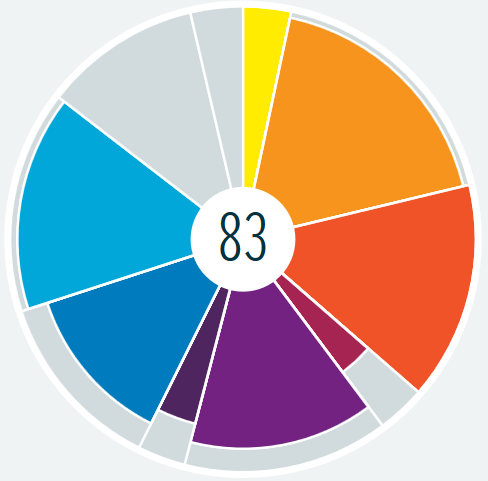
- To begin working, click on "START MY PATH". At first you will be presented with the "Learning Page" which poses a question and an explanation of how to solve it. You then click on "Start" to begin working on this topic. In order to add the topic to your pie, you must successfully answer the type of question several times in a row. If you are unsure of how to do the problem you can click on the "Explanation" button which will provide brief explanations as well as links to the e-book and videos if available. Headphones or computer speakers are necessary for this portion. When working on the topic, you should ask your instructor for help whenever you run into a problem, or just to clarify things.
- The ALEKS system will ask you to take a knowledge check at various times during the course. These assessments should be taken seriously as they can result in losing topics earned within the ALEKS pie. You should not get any type of assistance while taking a knowledge check. It is meant to assess what you know and to enable ALEKS help you with what you need to learn.
- When you complete a module (which may include one or several slices), you must take the corresponding homework assignment in ALEKS. Each assessment becomes available only after you complete the corresponding module. The assessments are accessed by clicking on the page menu (three dashes in the upper left-hand corner) and selecting the “Assignments” link. You have an unlimited number of attempts at these assignments. You must receive at least 70% to be eligible to take the exam.
- Once you pass the homework assessment for a module, you must request PAPER-BASED module exam from the instructor.
- After you successfully complete all five (5) modules, you must also take a cumulative PAPER-BASED final exam.
Grading
The course average will be computed as a weighted sum:
- 70% – the average of the five paper exams;
- 30% – final exam score.
To pass the course, you must:
- pass (i.e. get 65% or above on) each of the five paper tests;
- reach the five exam average of 70% or above;
- pass (i.e. get 70% or above on) the paper final exam.
| Letter Grade | Necessary and Sufficient Conditions |
|---|---|
| SA | Course average 90 and above. |
| SB | Course average 80–89. |
| SC | Course average 70–79. |
| R (repeat) | Passed at least 3 paper exams. The course must be repeated. You may continue from where you left off, as long as it is within one calendar year of when you began. |
| U (failed) | Met neither the completion requirements for passing the class, nor the sufficient progress criteria for the R grade. The course must be repeated. You may continue from where you left off, as long as it is within one calendar year of when you began. |
| UN (failed due to non-attendance) | May be given at the discretion of the instructor if you stop attending the class without communication with the instructor. The course must be repeated. |
| W (withdrawal) |
You withdraw from the class in accordance with the Course Withdrawal Policy. The course must be repeated. |
Withdrawal Policy
The College's Withdrawal Policy is outlined on the Academic Policies page (click the "Withdrawal Policy" link under the "Academic Standing" header). The Course Withdrawal Form, instructions and deadlines are on the Withdraw from Course page. In brief:
- Course Add/Drop: You may drop this course prior to the end of the add/drop period. If you do it, your academic record will not reflect your enrollment in this class.
- Official Withdrawal from the Course (Before Deadline): You may officially withdraw from the course any time between the end of the add/drop period and the end of the Course Withdrawal Period. In that case, a "W" (withdrawal) for this course will be included in your academic record. Withdrawal from a course is considered an "unsuccessful course attempt". It may negatively impact your financial aid eligibility and satisfactory progress requirements. To withdraw from the course before the course withdrawal deadline, use the Course Withdrawal Form.
- Official Withdrawal from the Course (After Deadline): You may appeal to the Grant Campus Associate Dean of Academic Affairs for a course withdrawal after the withdrawal deadline if you have experienced unforeseen or extenuating circumstances. To make the appeal, you must fill in the Request to Appeal for Course Withdrawal, have it signed by the instructor, and submit it to the Campus Associate Dean of Academic Affairs no later than seven business days before end of term.
- Official Withdrawal from the College: You may voluntarily separate from the college at any time during the academic term by dropping all your courses.
- Medical Withdrawal: If necessitated by medical reasons, you may request a medical withdrawal from all your courses at any time during the semester. Medical withdrawals are managed exclusively through the Grant Campus Associate Dean of Students. Medical documentation is required for consideration.
Calculator Policy and Technology Use
- During a regular class, students are permitted to use a calculator, but must bring it on their own.
- During an examination, students may only use a non-graphing calculator.
- Cell phones, graphing calculators, tablets, computers and all other electronic devices (with the exception of non-graphing calculators) are strictly prohibited during examinations, even if not used. Having such devices in the open when taking a test is a sufficient reason for an immediate failing grade for that test.
Attendance Policy
The class will be conducted in real time, face-to-face, in the format of a supervised computer-based self-study lab, as scheduled. This is not an online course. Attendance is mandatory. You must attend every class, even though you can (and should) work with the lab software system on your own.
Regular attendance is essential for academic success, and for that reason you are expected to attend every session of the class. Whether or not you are present, you are responsible for all that transpires in class, including course content, in-class work, tests and assignments, as well as class announcements and statement of class policies. Arriving late, leaving early or taking unreasonably long breaks counts as partial absence.
You are allowed one full week of absences, which includes those caused by illness, late registration, add/drop activity at the beginning of a term as permitted by College policy, and religious observance. If you are unable to attend a class, you must contact the instructor and take immediate steps to catch up with the course.
Absence or lateness in excess of one week may lead to a failing grade for the course or removal from the class.
Extra Help
- Don't hesitate to ask any class-related question right away — this class will encourage and facilitate your immediate feedback.
- Come to the instructor's office hours.
- Use free online or in-person
tutoring at the
Academic Tutoring Centers. Appointments can
be in-person or online. Online appointments are
allowed during the walk-in hours. Appointments
are done online through WCOnline system.
- To create a WCOnline account: go to https://sunysuffolk.mywconline.net/register.php, and complete the registration form using your Suffolk email address and a 10-plus character password (other than the one you use for SUNY Suffolk).
- To make an appointment:
- Login to your WCOnline account at https://sunysuffolk.mywconline.net/index.php;
- Select Math Tutoring - Fall
2026 from the "AVAILABLE
SCHEDULES"; The schedule is color-coded as
follows:
- White blocks = Available;
- Dark blue blocks = Not available;
- Bright blue blocks = Other appointments;
- Yellow blocks = Your in-person appointments;
- Green blocks = Your Zoom appointments.
- Click on a white box of your choice. Each white box is a 30-minute or 45-minute session depending on the subject. Complete the appointment pop-up form by choosing whether you would like a Zoom or in-person session. You can also upload any documents you would like to share with the tutor.
- Click ‘CREATE APPOINTMENT’. If prompted, use the course MAT007L – Algebra I Laboratory and instructor Alexander Kasiukov.
- After scheduling an appointment, check your Suffolk email for confirmation.
- Be on time. Please allow time for technical difficulties and contact us if they occur. If you scheduled a Zoom appointment, the tutor will email you the Zoom information before the session. In-person appointments will meet at your scheduled time at the Academic Tutoring Center located in the Learning Resource Center (LRC-149) on the Grant Campus. Vaccination is required for in-person tutoring.
- To join the waiting list: if a session you would like to attend is filled, you can join the waiting list. Click on the link link at the bottom right of each day on the schedule and fill in the pop-up form. If an appointment opens up, a notification will be sent to you via text or email.
- To cancel an appointment
- Login to your WCOnline account at https://sunysuffolk.mywconline.net/index.php;
- Click on your appointment box and click on the 'CANCEL' button. As a courtesy to your tutor and other students, we ask that you cancel appointments at least 2 hours before the session. This will allow time for another student to schedule that session. If you do not cancel within that time, it will be counted as a missed (no show) appointment. After 3 no shows, your account will be deactivated.
- To contact the Center: email at tutoringcenterwest@sunysuffolk.edu or call (631) 851-6369.
In-person tutoring takes place in Learning Resource Center, Room 149. Up to 8 people can be scheduled for the same in-person time slot.
- Use the college library online or in person.
- Get academic technology support from the Student Tech Centers and access computers, printers, and scanners in the Grant Computer Center.
- Get counseling and advising at the Counseling Centers. The Grant Campus Counseling Center is located in Caumsett Hall, Lower Level, Room 20 and can be reached at (631) 851-6250.
Disruptions
Disruptive behaviors, as defined by the Student Handbook, will not be tolerated. In case of violations, the college policy allows the instructor "to remove a student from a class for one class meeting, and, in those cases where the continued presence of the student poses a substantial threat or would be disruptive to the class, request that the Associate Dean for Student Affairs impose an interim suspension pending a disciplinary hearing."
Academic Integrity
Suffolk County Community College provides students with the opportunity to demonstrate their knowledge by submitting coursework that is uniquely theirs and giving proper attribution to the work of others. Participating honestly in the SCCC academic community ensures that students can take pride in their education and their contributions to scholarship. Without academic integrity, students gain unfair advantage over others and prevent their own intellectual progress. As a student in this class, you are expected to uphold the SCCC core value of integrity and understand the Special Procedures for Academic Dishonesty (section P. starting on page 23 of the Student Code of Conduct). Specifically, when academic integrity is violated, the college policy allows the instructor to "initiate student conduct action through the Campus Associate Dean for Student Affairs. The faculty member may impose any of the following penalties: require that the student repeat the assignment or the exam; give the student a failing grade for the assignment or exam; or give the student a failing grade for the course. Should the student believe that s/he has been wrongly or unfairly accused of academic dishonesty, the student shall have the right to pursue the matter though the Course Grade Grievance Procedure."
The Code prohibits academic misconduct, which includes any action that results in students giving or receiving unauthorized assistance in an academic exercise, or receiving credit for work that is not their own. Academic exercise includes all forms of work submitted for credit. Academic misconduct includes, but is not limited to, the following behaviors:
- cheating — unauthorized use of mobile devices, notes, textbooks, artificial intelligence tools or any other sources;
- plagiarism — use of another person's work or ideas without crediting them, including using material generated by artificial intelligence tools for an assignment without instructor authorization;
- complicity — giving help to, or receiving help from, someone engaged in academic misconduct;
- multiple submissions — submitting the same work for credit in more than one course without the instructor's permission;
- falsification and forgery — making up information or falsifying your own or someone else's identity.
Information about the Student Code of Conduct, plagiarism and the citation process can be found on the Academic Integrity Procedures web page. To learn more about academic integrity, college policies and expectations in this area, and proper ways to avoid possible violations, see the Academic Integrity and Plagiarism Guide.
Specific Academic Integrity Policy for this Course
During any assessment or other activity that contributes to your grade in this class, the following rules are in effect.
- No Note-Sharing: You are permitted to use paper-based notes and books, but must not share, pass, receive or borrow them.
-
No Breaks:
- All work must be completed in one sitting. If you take a break for any reason, your assessment ends at that point.
- To receive a course accommodation for a
medical condition that requires frequent
breaks, you must:
- contact the Office of Disability Services (see Disability Services section);
- get their approval, in the form of an official Accommodation Letter clearly stating your need for frequent breaks;
- present your Accommodation Letter to your instructor;
- notify the instructor of your intent to use this accommodation on any scheduled exam no later than 10 days prior to that exam's date, allowing the instructor sufficient time to divide and administer the exam in smaller installments to meet your needs.
- If an acute medical emergency occurs during an exam, stop immediately and seek medical help. An exam make-up may be granted at the sole discretion of the instructor. To be considered, you must submit official documentation of the medical emergency (such as a doctor's note) to the instructor no later than 24 hours after the end of the exam. (If the emergency prevents you from notifying the instructor within this 24-hour window, you should contact the instructor as soon as possible to discuss an incomplete "INC" grade for the course.)
- No Electronic Devices: All electronic devices (including smart glasses, cell phones, scientific and graphing calculators, smartwatches, tablets, computers, etc.) are strictly prohibited, with the sole exception of basic four-function calculators. The mere presence of an unapproved device — even without active use — gives the instructor sufficient grounds to immediately dismiss you from the test with an automatic failing grade for the assessment, counted as an official policy offense.
-
Mandatory Verification: If your work
raises suspicion of academic dishonesty for any
reason, the instructor may ask
you to:
- retake the assessment (in full or in part) with a completely new assignment; or
- redo the assignment live in front of the instructor; or
- provide a detailed, step-by-step oral or written explanation leading to the final result.
- No AI: The use of artificial intelligence (AI) is strictly prohibited and will be handled as a direct violation of course policy. (While you are encouraged to utilize AI tools outside of assessment activities, you must understand, validate, and internalize AI output with your own logic and work.)
First offense during the semester will result in a failing grade for that assessment. Second offense during the semester, or any offense during the final exam will result in a failing grade for the whole course.
Accommodations
Religious Observance
In accordance with the New York State Education Law §224-a, your absence from class necessitated by religious observance will be deemed an excused absence.
Notification: You must notify the instructor of your intention to be absent from a particular class due to a religious observance. The notification must occur at least one week prior to the religious observance (but should be made as far in advance as possible). The notification must be sent from your college email account or otherwise in writing.
Make-up Accommodations: If missing a class due to religious observance, you will be given an opportunity to make up any missed examination, study, or work requirements within a reasonable amount of time of the religious observance. While the college will consider all religious observance or religious accommodation requests, accommodation of a request that would fundamentally alter the nature or operations of the course or program of study, or that would result in a significant number of absences within a course, or substantially impact class participation requirements, may not be reasonable or feasible. If your request involves an alternate exam date or time, you should expect that any make-up exam must be equivalent, in terms of format and difficulty, to the exams given to the other students enrolled in the course.
Please refer to the Religious Observance Policy for additional information.
Disability Services
Suffolk County Community College provides reasonable accommodations to registered students with disabilities who have self-identified and been approved by the Office of Disability Services. Once you are approved for reasonable accommodations, the Office will provide you with an official Accommodation Letter describing your specific accommodations. You must present this letter to your instructor before any accommodations can be provided in this class.
If you have, or think you may have, a disability, you are invited to contact the Office of Disability Services for a confidential consultation. For the Michael J. Grant Campus office, you can call the Office at (631) 851-6355, contact it via email disabilityG@sunysuffolk.edu, or stop by to make an appointment in Caumsett Hall, Lower Level, Room 20.
Pregnancy or Related Conditions
Suffolk County Community College is committed to creating an accessible and inclusive environment for all students. Title IX of the Education Amendments of 1972 prohibits sex discrimination, including discrimination and harassment against students on the basis of current, potential, or past pregnancy or related conditions with respect to the college's education programs and activities. Pregnancy or related conditions will be treated in the same manner and under the same policies and practices as any other temporary medical condition. Students who are pregnant or have pregnancy-related conditions may request reasonable modifications when necessary, by contacting one of the college's Deputy Title IX Coordinators.
More information can be found in the Student Handbook and in the college's Student Pregnancy or Related Conditions Anti-Discrimination and Reasonable Modifications Procedures .
Mental Health and Wellness Services (MHWS)
SUNY Suffolk understands that your academic success goes hand-in-hand with your mental health and well-being. If you ever need support for your emotional, psychological, or social well-being, Mental Health and Wellness Services are here for you. Counseling services are free and completely confidential.
For more information about MHWS, visit MHWS website or follow @scccmentalhealth on Instagram. You can contact the Services via email mentalhealth@sunysuffolk.edu. or call (631) 851-6876 to speak with a Michael J. Grant Campus counselor. The Grant Campus office is located Sagtikos Building, Room 200.
Preventing Spread of Respiratory Viruses
When You're Sick
CDC's Respiratory Virus Guidance (updated August 18, 2025) recommends that if you have symptoms of common respiratory viruses — such as COVID-19, flu, and RSV — that aren't better explained by another cause, you may be contagious and should stay home and away from others. You may return to normal activities when your symptoms have been improving for at least 24 hours, and — if you had a fever — when your fever has been gone without use of fever-reducing medication for at least 24 hours. After returning to normal activities, you should continue to take added precaution using prevention strategies such as
- wearing a well-fitting mask for the next 5 days,
- enhancing hygiene practices,
- keeping a distance from others, and/or
- testing when you will be around other people indoors.
When You Tested Positive
If you never had symptoms but tested positive for a respiratory virus, you may be contagious and should take the same added precautions for the next 5 days when you will be around other people indoors. If you develop a fever or start to feel worse after you have gone back to normal activities, the CDC recommends that you follow again the stay-home precaution outlined above before returning to normal activities.
Record of Exam Results
You can use the following table to keep track of your progress in the course.
| Target Class | Exam | Chapters and Topics Covered | Assignment Grade | Exam A | Exam B | Exam C |
|---|---|---|---|---|---|---|
| Class #4 | Exam #1 |
|
||||
| Class #8 | Exam #2 |
|
||||
| Class #13 | Exam #3 |
|
||||
| Class #20 | Exam #4 |
|
||||
| Class #25 | Exam #5 |
|
||||
| Class #28 | Final Exam | Entire Pie |